
Smartline call reports by WTCO
Know every customer your business missed yesterday.
Your phone system already records every call. Smartline turns it into a plain-English report in your inbox before you start work: who rang, who got through, and who is still waiting on a call back.
LAUNCH OFFER · FIRST 5 BUSINESSESHalf-price setup + your first month free
Works with most business phone systems · Nothing to install · Call 1300 765 985
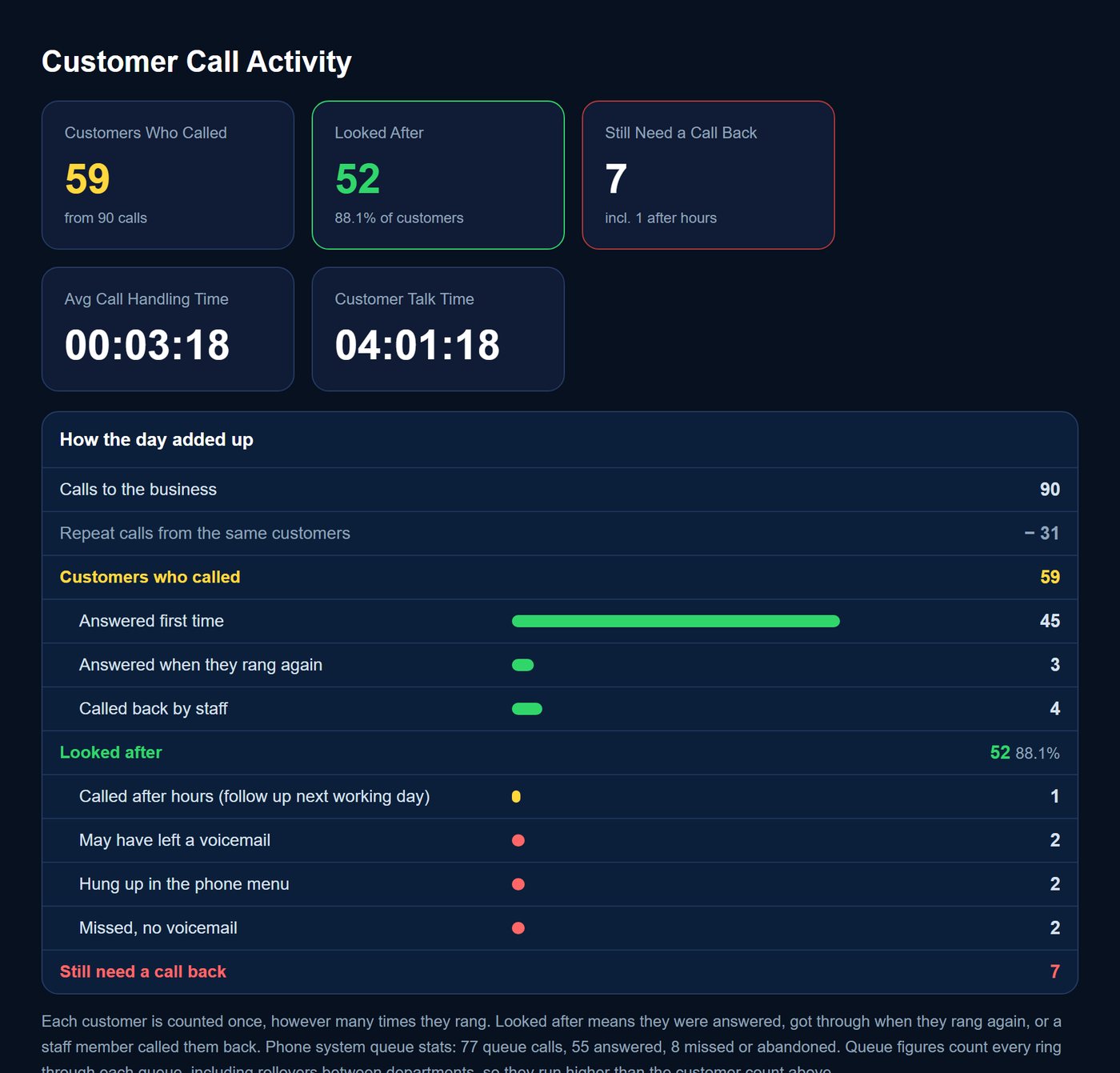
90
calls to one real business on a busy Tuesday
59
customers, once repeat calls were counted once
52
looked after: answered or called back
7
still waiting at close. Without a report, nobody knew who.
The problem
Your phone is your front door. Nobody is watching it.
Customers ring, and most get through. Some reach voicemail and don’t leave a message. Some hang up in the phone menu, ring after hours, or try twice and give up. Those calls leave no trace, so nobody knows how many customers the phone is quietly losing.
You might not have a marketing problem. You have a visibility problem.
What is one missed customer worth to you?
If just one caller a week rings a competitor instead, and the job is worth $1,500, that’s about $6,500 a month walking out the door.
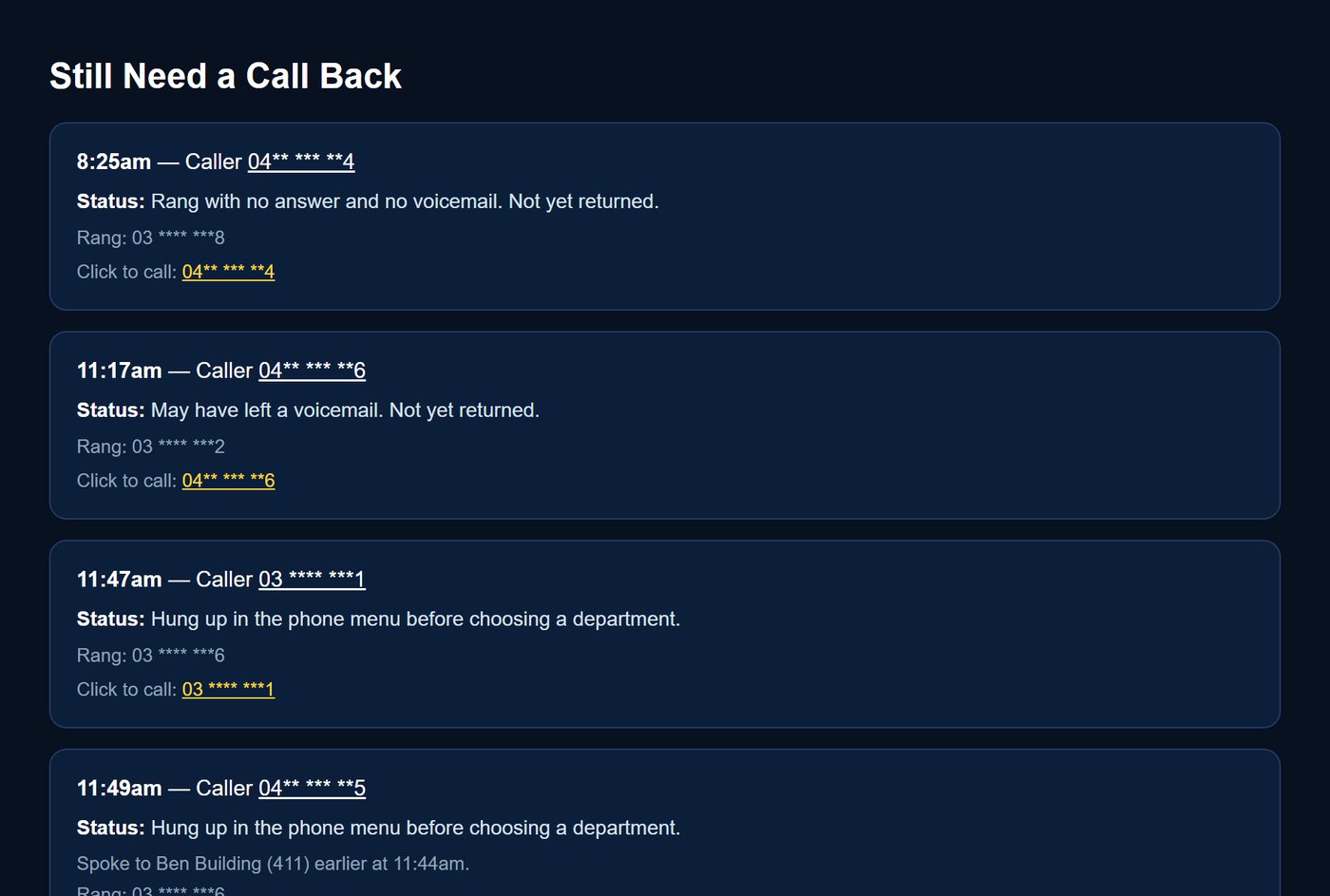
The call-back list: only the people nobody has got back to, with a number to tap. (Numbers masked.)
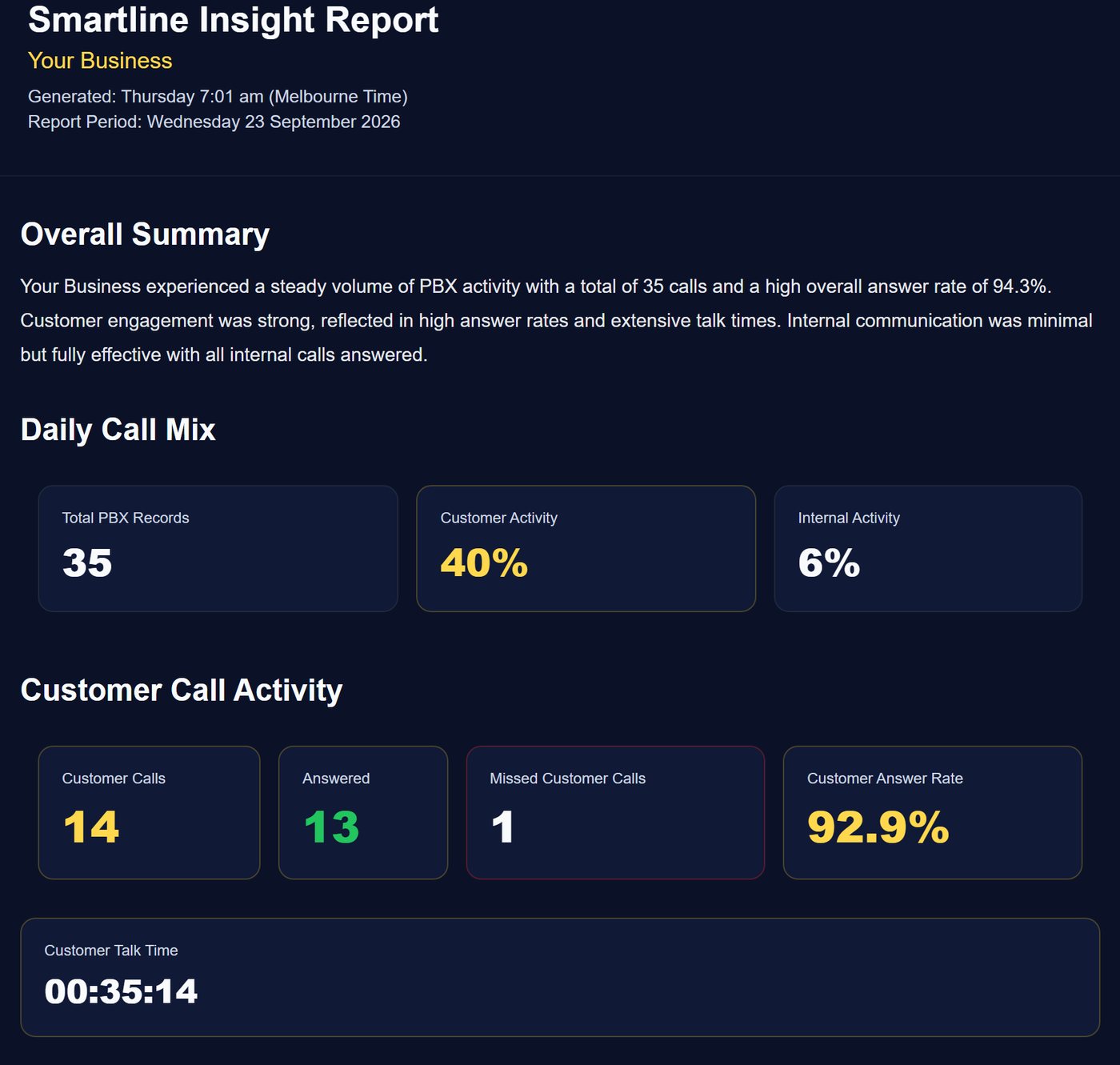
A real Smartline Insight report, with the business name changed.
Every morning
One email. Everything you need to know about yesterday.
- Every missed caller: the number, the time, and what happened to them.
- Call-back tracking: who rang them back, and how quickly.
- Your busiest times, so you roster to the peaks instead of guessing.
- Who’s answering: which people and departments carried the load.
- Carried over: yesterday’s late and after-hours callers, and who got back to them.
- No dashboards, no logins. It’s waiting in your inbox before you start work.
Your numbers
What would Smartline save you?
Move the sliders to match your business. We’ll show the manager time Smartline saves, and what winning back a few missed callers is worth.
On the real day above, 7 of 59 customers (12%) were still waiting at close.
Be conservative. Even a few customers a month adds up.
$70/hr is a $100k manager plus super, leave and on-costs.
Value to your business each month
$0
Manager time saved
Value of that time
Customers won back a month
Value of customers won back
Smartline plan
Time saved comes from our time study: we worked through a real day of 150 to 200 call records by hand (download, sort, check every missed caller for a call back, departments and trends) and timed each step, over 21.7 working days a month. Customers won back = calls a day × % not getting through × % won back × 21.7 days. Estimates only; your demo uses your real calls.
Plans · all prices include GST
Pick the report that fits how your business answers the phone.
One front desk or a small team: Insight. Departments, queues or a phone menu: Intelligence. Want to see how things are trending over weeks and months? Add 360.
Insight
Daily call report
$66/mo
Setup $440
- Every caller, counted once
- Missed calls and call-backs
- Busiest times
- Who’s answering
Saves about 11 hrs of manager time a month
Insight 360
Daily report with history and trends
$132/mo
Setup $660
- Everything in Insight
- History dashboard
- Week-on-week trends
- Weekly and monthly reports
Saves about 21 hrs of manager time a month
Intelligence
Daily report by department
$199/mo
Setup $795
- Everything in Insight
- Customer journey across departments
- Queues, staff and phone menu
- Dropped transfers and menu hang-ups
Saves about 27 hrs of manager time a month
Intelligence 360
Departments with history and trends
$279/mo
Setup $1,015
- Everything in Intelligence
- History dashboard
- Department trends over time
- Weekly and monthly reports
Saves about 41 hrs of manager time a month
Launch offer: the first 5 businesses get half-price setup and their first month free. · Download the plan guide (PDF)
Smartline 360
See the trend, not just the day.
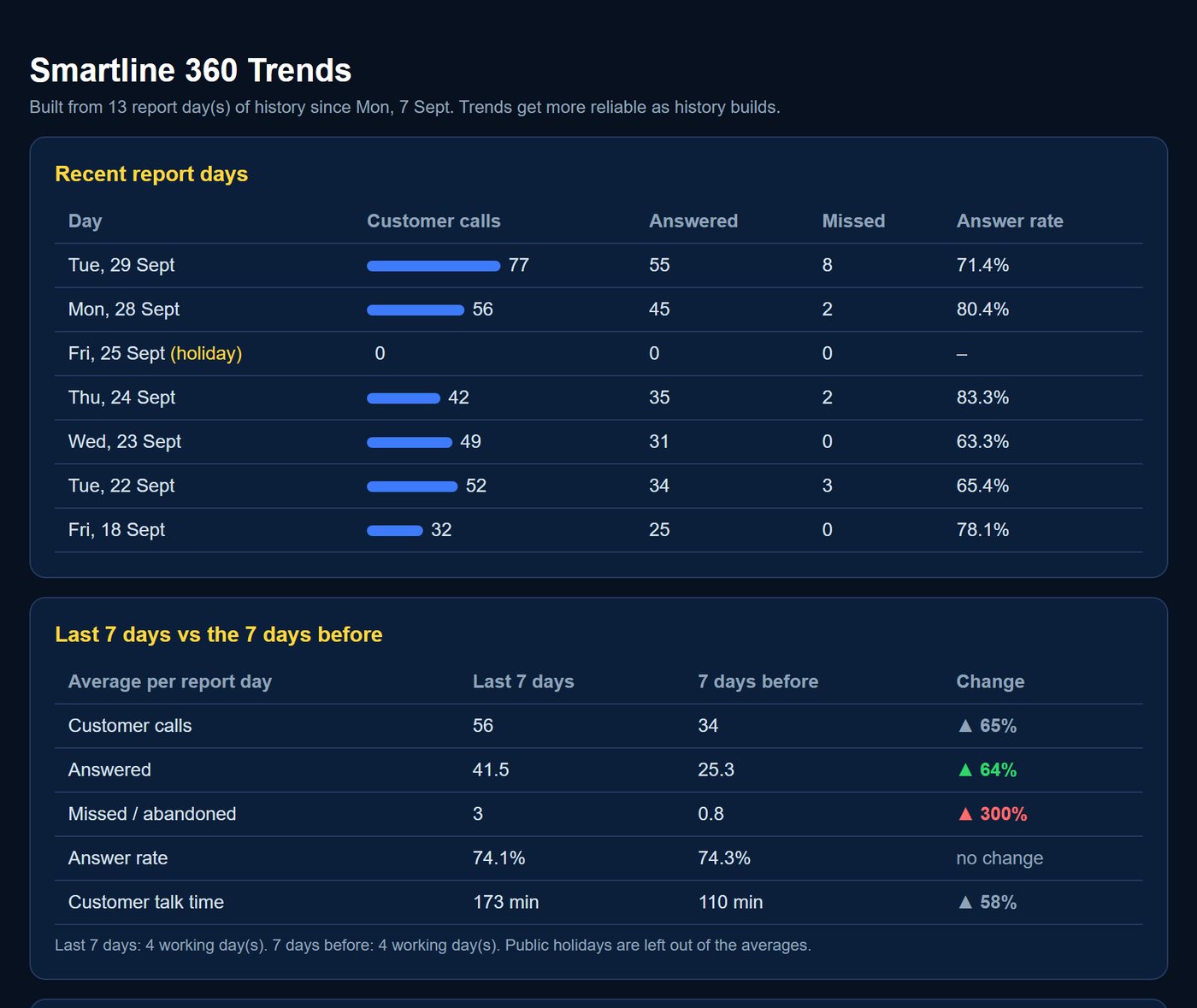
360 keeps your history, so you can see whether things are getting better or worse: busier weeks, answer rates slipping, missed calls creeping up. It’s the report you take to the Monday team meeting and the monthly review.
- Recent days side by side, with public holidays shown.
- This week vs last week, with the change highlighted.
- A history dashboard to look up any past day.
Your industry
The same report tells a different story in every business.
Trades & services
The call comes while you’re up a ladder. Know about every enquiry you couldn’t take, and chase it before breakfast.
Trades brochure →Medical & health
The Monday rush. See every patient who didn’t get through, and roster to the peak. Call logs only: no clinical data.
Medical brochure →Motels & hospitality
Check-in hour is when bookings ring out. Catch late and after-hours enquiries before they book elsewhere.
Hospitality brochure →Schools
Before the bell and at pick-up. A morning list of parents still waiting to hear back.
Schools brochure →Sales teams
Dials, answer rates and talk time for each rep, plus inbound leads nobody answered.
Sales teams brochure →Multi-department
One number, many teams. See how each department handled its calls, and which transfers dropped.
Multi-department brochure →Professional services
Clients expect a call back the same day. Know who rang, who was answered and who is waiting.
Request a demo →Retail & food
A queue at the counter and the phone rings. See the stock and order calls you missed, and your busy hours.
Request a demo →Built for real businesses, not call centres
One report. Everyone on the same page.
Call-centre software is built for rows of agents and wallboards. Most businesses have a front desk, a few teams and staff who are also doing other work. The value of a daily report isn’t the numbers. It’s that everyone starts the day knowing the same thing.
Who is still waiting, and whose job it is to call them.
For your staff
- A short list, not a call log. Exactly who still needs a call back.
- Credit, not blame. Who carried the load and made the call-backs.
- Clean handovers. Late callers carry over to the next morning.
- Nothing new to learn. One email.
For managers and owners
- One number that matters: customers looked after.
- Staffing on facts. Busy hours show when to cover breaks.
- Routing that works. Menu hang-ups point to call-flow fixes.
- Something to review. Weekly and monthly trends.
How it works
From demo to your first report, without the hassle.
Request a demo
Tell us about your business and the phone system you have now. It takes a minute.
See your sample report
We send a sample Smartline report built for your business, so you can see exactly what you’d get.
Say yes online
Happy? Click “Yes, set me up”, pick your plan and we send the setup invoice.
Reports every morning
Once setup is paid we connect your phone system, and your first report lands before you start work.
Already have a business phone system? Smartline works with most business phone systems, so you may not need to change a thing. If yours isn’t suitable, or you’re ready for an upgrade, we can help with that too.
Call flow design
Most missed calls are designed in by accident.
Your call flow is the path a call takes: which phones ring, in what order, for how long, and what happens when you’re closed. A good call flow fixes missed calls before they happen. Smartline shows you whether it’s working.
Set your real opening hoursAdd public holidays, so callers hear the right message.
Ring in stagesReception first, then the team joins in. About 20 seconds a stage works.
Keep menus shortThree or four options at most, the most common first. Long menus are where callers hang up.
Reach people where they areOne extension can ring a desk phone, a PC app and a mobile app.
Make after hours usefulSay when you open, then offer voicemail, sent to email for two people, not one.
Then check it worksYour daily report shows menu hang-ups, after-hours callers and transfers that never connected.
Free eBook · no sign-up needed
The Missed Call Playbook
How to see every customer who rings your business, get hours of your manager’s week back, and design a call flow that keeps customers instead of losing them. 10 pages, plain English.
- The calls you never hear about
- The hidden cost of reporting by hand
- Reading a report that makes sense
- Designing your call flow
- Built for real businesses
- Everyone on the same page
- Your industry
- Choosing a plan
Questions
Good questions, straight answers.
Does it work with my phone system?
Smartline works with most business phone systems that can export their call records. Tell us what you have when you request a demo and we’ll check. If your system isn’t suitable, or it’s due for an upgrade, we can help with that too.
Do I need to install anything or log in?
No. Your report arrives by email every morning. The 360 plans add a history dashboard you can log into when you want to look back.
What about privacy?
Smartline only reads the call log: times, numbers and which extension answered. No call recordings, no customer records, and only the people you choose receive the report.
What does it cost?
From $66 a month including GST, with a one-off setup fee from $440. See the plans above. The launch offer gives the first 5 businesses half-price setup and their first month free.
How does setup work?
After your demo, you confirm your plan online and we send the setup invoice. Once it’s paid, we connect your phone system and your first report lands in your inbox before you start work.
What if it doesn’t work for us?
WTCO’s 100% satisfaction guarantee: if it doesn’t work as it should, we work for free until it does.
Launch offer · first 5 businesses only
See your own calls. Half-price setup, first month free.
Request a demo and we’ll build you a sample Smartline report. No obligation.
*Launch offer limited to the first 5 new Smartline Reports customers. First month free applies to the Smartline subscription. Compatibility depends on the business phone system and availability of the required call data. Time saved figures are estimates from a WTCO time study; prices include GST.